VOID CLIENT
Way more FPS
Sodium rewrites how chunks are drawn, and Lithium speeds up game logic. Built-in laptop graphics often run a lot faster.
Void Client boosts your FPS, stops the random freezes and adds a clean purple HUD, zoom and voice chat. It checks your PC and picks the best settings by itself.

Built on the best performance mods out there, plus our own HUD. No cheats, ever.
Sodium rewrites how chunks are drawn, and Lithium speeds up game logic. Built-in laptop graphics often run a lot faster.
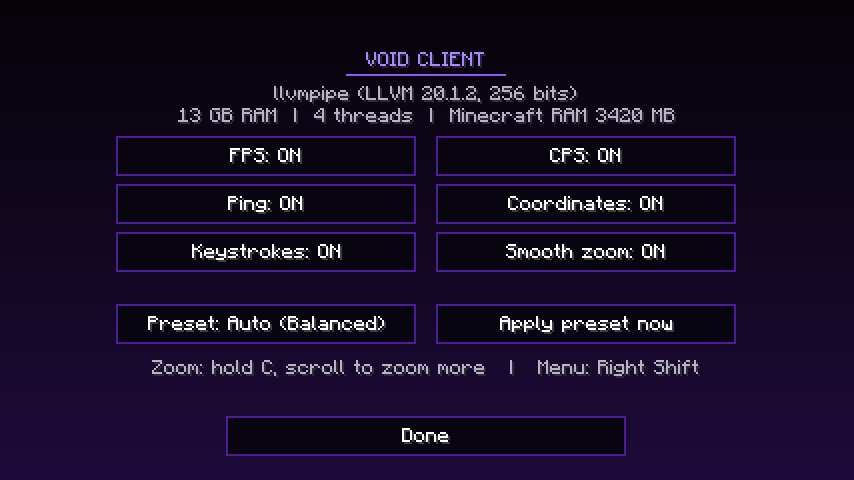
Checks your graphics card and RAM on first launch and picks Potato, Balanced or High. Change it anytime with Right Shift.
FerriteCore cuts memory use, and the installer gives Minecraft the right amount of RAM for your laptop. That fixes the "0 FPS for a few seconds" stutters.
FPS, CPS, ping, coordinates and keystrokes in a clean purple-and-black style. Turn each part on or off.
Hold C to zoom and scroll to zoom further. Mouse sensitivity drops while zoomed so aiming stays steady.
Simple Voice Chat is included, so you can talk to nearby players on servers that support it. Push to talk with Caps Lock.
The same Void Client works on a 4 GB school laptop and a gaming laptop. It picks the preset for you.

You need Minecraft: Java Edition and the normal Minecraft Launcher. Void Client adds itself to the launcher you already have.
Get VoidClient-Installer.exe and open it. Close the Minecraft Launcher first.
It downloads every mod straight from Modrinth, checks each file, and sets the right RAM for your laptop.
Open the Minecraft Launcher, choose Void Client next to the Play button, and press Play.
That warning shows for new apps that haven't built up a download history with Microsoft yet. Click More info, then Run anyway. The installer only adds a Void Client profile to your Minecraft Launcher and downloads mods from Modrinth. Its source code is public.
It shouldn't get you banned. Void Client has no X-ray, reach, autoclicker, kill aura, fullbright or minimap radar, and it never sends anything to servers. Coordinates hide themselves on servers that turn on reduced debug info. The mods inside are the same kind big servers like Hypixel allow. If a server lists banned mods, give it a quick check.
It installs without admin rights, into your own user folder. Some schools block new apps or downloads from certain sites. If the installer can't download, try again on home Wi-Fi.
Void Client keeps its own folder at %APPDATA%\.voidclient, so it never touches your normal Minecraft. Your server list is copied over the first time. To bring a world, copy it from %APPDATA%\.minecraft\saves into %APPDATA%\.voidclient\saves.
Download the newest installer and press Install again. It swaps in new mod versions and leaves your worlds, settings and any extra mods you added alone.
%APPDATA%\.voidclient (paste it into the File Explorer address bar).Download the VoidClient.mrpack and import it as a new instance. Set the memory to 2 GB on a 4 GB laptop, 3 GB on 8 GB, or 4 GB on 16 GB.